Explore Container Images
Containers on CVMFS
There are a few Apptainer containers accessible by keyword slc5, slc6,
centos6 and centos7 through command setupATLAS -c. There are many other
images available under /cvmfs/unpacked.cern.ch/. If this CVMFS path is not
visible, please add this mount point to the CVMFS client on your computer.
lxplus$ ls /cvmfs/unpacked.cern.ch/
gitlab-registry.cern.ch  logDir  registry.hub.docker.com

lxplus$ ls /cvmfs/unpacked.cern.ch/registry.hub.docker.com/
atlas        atlasml   cmssw      jodafons  lofaruser      siscia
atlasadc     atlrpv1l  danikam    kratsg    lukasheinrich  stfc
atlasamglab  clelange  engineren  library   pyhf           sweber613

lxplus$ ls /cvmfs/unpacked.cern.ch/registry.hub.docker.com/atlasml
atlasml-base:latest    ml-base:centos           ml-base:py-3.6.8
atlasml-base:py-3.6.8  ml-base:centos-py-3.6.8  ml-base:py-3.7.2
atlasml-base:py-3.7.2  ml-base:centos-py-3.7.2
The containers under /cvmfs/unpacked.cern.ch/registry.hub.docker.com/atlasml/
are for machine learning. For Atlas release containers, they are under
/cvmfs/unpacked.cern.ch/registry.hub.docker.com/atlas/
lxplus$ ls /cvmfs/unpacked.cern.ch/registry.hub.docker.com/atlas
analysisbase:21.2.10            athanalysis:21.2.102
analysisbase:21.2.100           athanalysis:21.2.10-20171115
[...]
analysisbase:21.2.16            athanalysis:21.2.19
analysisbase:21.2.16-20180129   athanalysis:21.2.19-20180221
analysisbase:21.2.17            athena:21.0.15
analysisbase:21.2.17-20180206   athena:21.0.15_100.0.2
analysisbase:21.2.18            athena:21.0.15_31.8.1
analysisbase:21.2.18-20180213   athena:21.0.15_DBRelease-100.0.2_Patched
analysisbase:21.2.19            athena:21.0.23
analysisbase:21.2.19-20180221   athena:21.0.23_DBRelease-200.0.1
analysisbase:21.2.60            athena:21.0.31
analysisbase:21.2.88            athena:21.0.31_100.0.2
athanalysis:21.2.10             athena:21.0.31_31.8.1
athanalysis:21.2.100            athena:22.0.5_2019-09-24T2128_100.0.2
athanalysis:21.2.100-20191127   athena:22.0.6_2019-10-04T2129
athanalysis:21.2.101            athena:22.0.9
athanalysis:21.2.101-20191208
Let us take an example of release AthAnalysis,2.2.115 under
/cvmfs/unpacked.cern.ch/registry.hub.docker.com/atlas/
lxplus$ apptainer exec -c /cvmfs/unpacked.cern.ch/registry.hub.docker.com/atlas/athanalysis:21.2.115 bash
Apptainer> ls /home/atlas
release_setup.sh
Apptainer> source /home/atlas/release_setup.sh
Configured GCC from: /opt/lcg/gcc/8.3.0-cebb0/x86_64-centos7/bin/gcc
Taking LCG releases from: /opt/lcg
Taking Gaudi from: /usr/GAUDI/21.2.115/InstallArea/x86_64-centos7-gcc8-opt
Configured AthAnalysis from: /usr/AthAnalysis/21.2.115/InstallArea/x86_64-centos7-gcc8-opt
[bash][yesw AthAnalysis-21.2.115]:~ >
That is, start the wanted container, then source /home/atlas/release_setup.sh.
Containers on Docker Hub
The Docker hub hosts the largest container images. You can input keyword to
search on the hub. For
example, you can put a keyword atlas/ under the search field as shown below:
- A screenshot of searching for
Atlas/on the Docker Hub: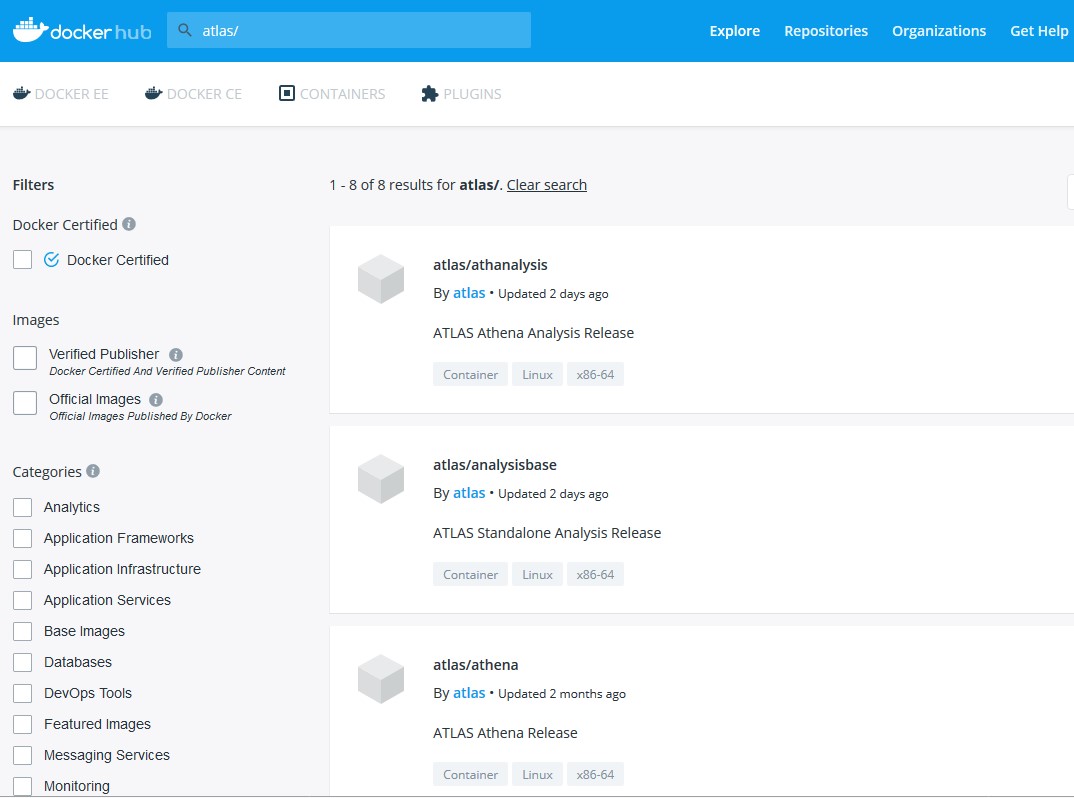
Click on the found container, it will provides the pull command instruction and sometimes also a brief description.
Containers on Other Registries
Apptainer can pull images from any OCI-compliant registry, such as the
GitHub Container Registry (ghcr.io) or
the CERN GitLab registry (gitlab-registry.cern.ch),
using the docker:// or oras:// prefix. See
Support for Docker and OCI Containers
for more details.
Note
The Singularity Hub (shub://) and the Sylabs Container Library
(library://) are no longer available. Use docker:// or oras://
sources instead.